While you're mixing — and to know where you're heading — you'll probably find it useful to place a reference track on a dedicated track. If your song is in the style of the band Cytrobal (no, that band doesn't exist...) or if you want to get a mix that's close to what they do, pick one of their songs, drop it onto a track in your project, and listen to it carefully. Not to enjoy it, but to hear how the instruments sound, what stands out the most and at which moment, what effects are used and at what amount, how the instruments are placed, how they stand apart from one another, and so on.
Then, try to draw inspiration from it to give the same color, the same tonality to your own work. Switch back and forth between your song and the reference track to compare as the mix progresses, and see if you're on the right path. It's not easy — it's a matter of experience, of habit, and also of gear, since you don't have the same instruments or the same amps as the reference artist, so you won't be able to get exactly the same sound. But it'll serve as a guide, and maybe as inspiration. It's not a mandatory step at all, but it can make for an excellent learning exercise: "today, I'm going to mix like Cytrobal"!!!
RECORDING QUALITY
Don't neglect the quality of the recording by telling yourself you'll fix or mask your mistakes during the mix. The better the take is to begin with, the fewer corrections you'll have to make later on. We're not all virtuosos, and it's better to record the same take twenty times in a row until it's "perfect" than to settle for a mediocre take that you'll try to tweak afterwards.
RECORDING FORMAT
Which recording format should you go for? An audio CD uses a 44.1 kHz / 16-bit format, but I strongly recommend recording at 24 bits to gain calculation precision, and therefore quality, even if you ultimately deliver the final version of your song in CD format. During the recording and mixing stages, it's better to secure the highest possible quality, while staying reasonable. Even if your gear allows it, there's no point in working at 192 kHz / 24 bits.
Personally, I've settled on 48 kHz / 24 bits, which is a good compromise between sound quality, file size, and the load it puts on the computer. That said, 44.1 kHz / 24 bits is a more common choice, since the risk of loss during conversion to CD format is lower than from 48 kHz. Logical. However, I've personally never heard any sonic degradation after converting from my recording format to CD format. That doesn't mean there isn't any, obviously.
The heavier the chosen format, the longer and more complex the computations will be, for a difference in sound quality that won't necessarily jump out at your ears.
As an example, the size of a one-minute stereo WAV file will vary as follows depending on the chosen quality:
96 kHz / 24 bits — 32.9 MB 96 kHz / 16 bits — 21.9 MB
88.2 kHz / 24 bits — 30.2 MB 88.2 kHz / 16 bits — 20.1 MB
48 kHz / 24 bits — 16.4 MB 48 kHz / 16 bits — 10.9 MB
44.1 kHz / 24 bits — 15.1 MB 44.1 kHz / 16 bits — 10 MB
You can see that the difference between 16 and 24 bits is very significant for a given kHz value (66% gap), reflecting the precision and quality of the file.
Finally, you could consider the CD a reference in terms of format (44.1 kHz and 16 bits), but the CD is no longer the main listening medium today. Many people end up listening to audio files that aren't on a physical CD. The 44.1 kHz rule no longer really applies. An MP3 file can perfectly well be encoded at 48 kHz, so unless you're specifically aiming for CD format, there's no need to worry about whether to go with 44.1 or 48 kHz.
RECORDING LEVEL
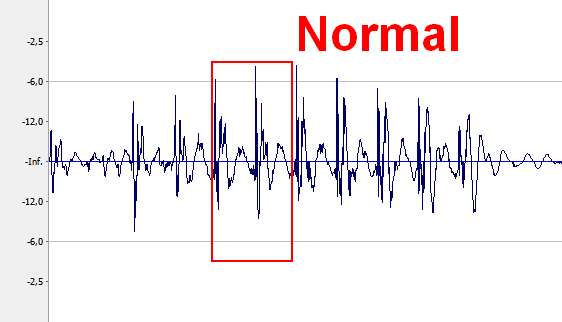
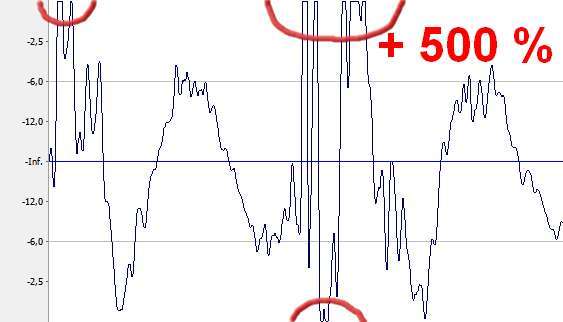
What's the right recording level? In digital recording, there's a level you must never exceed: 0 dB (zero decibels). Zero is the ceiling — anything above is off-limits, red zone, no-go area! Why? Because when the sound goes above this level, distortion appears — but not the kind of distortion you'd want on a guitar. In fact, beyond 0 dB, it's as if the sound were slamming into the ceiling. In the graphs below, you can see the waveform at normal volume, then the same waveform with the volume increased by 500%. You can see that the audio peaks get squashed, deformed — and that's what happens when you go over 0 dB during recording. It's called clipping. If this clipping is too severe and too frequent throughout a recording, it becomes audible and considerably degrades the sound quality.
To avoid this, you need to set the input level beforehand. For the guitar, play a few notes or chords while hammering away at the strings a bit, and adjust the input level so that this hammering doesn't exceed -6 dB on the DAW track's meter. For vocals, sing into the mic at the loudest volume you think you'll reach for your song, and likewise make sure the vocal track's meter doesn't exceed -6 dB. Same for every instrument you record. That way, when you actually record for real, and if the setting is right, you'll be almost guaranteed not to hit the ceiling under any circumstances.
No need to be paranoid about it, though. If during the recording you see the meter going into the red and you only exceed 0 dB once or twice very briefly, it won't be a problem. It probably won't be audible, and at worst, you can touch up the sound a little at that exact spot. On the other hand, if you're constantly slamming into the red, stop the recording, lower the instrument's input level, and start again. Either you forgot to set the level, or you played or sang much louder than during your soundcheck. Obviously, if you set your vocal levels by whispering into the mic and then record yourself screaming, you're going to be in for some surprises! And not the good kind!
SPOTTING FLAWS
A way to spot flaws:
Once you've finished your mix, listen to it for pleasure if you want, then move on to something else. Forget about your song, walk the dog, read a book, go see some friends... Let a day go by, or even two, without listening to the song at all. And then come back to it: you're going to rediscover it with a fresh, rested pair of ears, and its strengths and flaws will jump out at your eardrums!
Right away, write down what bothers you during this rediscovery: guitar 1 is too loud, or the vocals are too brash, or the kick is too prominent, or this, or that... Write down everything that doesn't sit right with you and that seemed obvious, and fix your mix. Then let some time go by again, and listen again, until everything sounds the way you want it.
This process can take more or less time, but it's very effective.
STARTING OVER FROM SCRATCH
If despite all your efforts your mix doesn't satisfy you, don't hesitate to start over from scratch.
Keep the raw sound, delete all your settings and effects, and start over. You can even redo the recording if you feel that's what's causing the problem, but without going that far, you can already restart the mix and redo all your settings. There's little chance you'll do the exact same thing twice, and new settings might satisfy you more.
Uh... still, keep your first mix tucked away somewhere (by giving a new project name to your new attempt) — you never know. If you can't manage to do better, you'll be glad to be able to find your original settings again!
YOU CAN'T PLEASE EVERYONE
Mixing is not an exact science, and the result you get may very well please one person and displease another. The same person can even find a mix great one day and find flaws in it the next, depending on their mood at the moment. It's all about compromise, but you are the main judge of the result. After all, you're the author — only you can know whether the result satisfies you and matches what you were aiming for.
KNOW YOUR TOOLS
Learn to know your gear and your software. If you need to perform a specific task, you'll save time if you've taken the time to consult the manual that came with it, rather than clicking around hoping to find THE function you're looking for somewhere in the menus. The more so since the more complex the software, the greater the number of functions, and you risk spending considerable time searching for something whose exact name you might not even know... The learning curve can be long, but it's very rewarding.
MIXING WITH HEADPHONES
Why do people say you shouldn't mix with headphones? It's not recommended, but nothing forbids it.
First of all, headphones all have different characteristics. Some are good at reproducing precise lows, others excel in the highs, and so on. As with monitors, it's hard to find truly neutral headphones, and the proximity of the sound to your ears also disrupts "normal" listening. In everyday life, you don't hear the sounds around you through headphones. Sounds travel through the air, through the space between you and them, before tickling your eardrums. This daily perception is altered by headphones.
Another important effect: stereo. With monitors, you hear with your right ear what comes out of the left speaker, and vice versa. With headphones, this crossover of sounds from one side to the other no longer happens. What's on the left stays entirely on the left, and your right ear won't hear it. When mixing with headphones, you might want to compensate for this by adding, for example, a bit of the left sound to the right to rebalance the listening — something you wouldn't have done when mixing on monitors. That doesn't mean it's wrong, but it can lead to different mixing choices.
Once again, the best approach is to be able to listen to your mix on several playback systems (several headphones too) to maintain a degree of neutrality.
DECIBELS
By the way, what's a "dB"?
It's pronounced "dee-bee", but you may have already guessed that. And it's the abbreviation for "decibel", a unit of sound volume. Unlike units of length or weight, for example, the decibel is logarithmic. In length, 100 meters is twice 50 meters. In acoustics, 100 dB is not twice 50 dB — it's 130,000 times more! The energy released by a sound doubles every 3 dB. In other words, 53 dB is twice 50 dB, 56 dB is twice 53 dB and four times 50 dB, and so on. By the time you reach 100 dB, you'll have multiplied by 130,000!!!
That said, let's put things in perspective, because between the theoretical numbers and actual perception, there's quite a difference. It's hard to claim "by ear" that the sound of a nightclub is 130,000 times louder than the noise of a washing machine... From what I've read here and there, to the ear, the sensation of doubled volume happens more like every 10 dB. So 100 dB would feel about 32 times louder than 50 dB. Obviously, it's still a bit tricky to quantify this kind of value. The more so since perception varies between individuals, physical condition, age, fatigue, and so on. We're in subjective territory.
Example values (sourced from Wikipedia):
- 0 dB: threshold of hearing
- 0 to 10 dB: desert
- 10 to 20 dB: recording booth
- 20 to 30 dB: hushed conversation, whispering
- 30 to 40 dB: forest
- 40 to 50 dB: library, dishwasher
- 50 to 60 dB: washing machine
- 60 to 70 dB: tumble dryer, phone ringtone, television, normal conversation
- 70 to 80 dB: vacuum cleaner, noisy restaurant, train passing at 80 km/h
- 80 to 90 dB: lawnmower, car horn
- 90 to 100 dB: heavy-traffic road, chainsaw, forging workshop, high-speed train at 300 km/h at 25 m
- 100 to 110 dB: jackhammer less than 5 meters away on a street, nightclub
- 110 to 120 dB: thunder, boilermaker's workshop, vuvuzela at 2 meters
- 120 to 130 dB: fire engine siren, airplane taking off (from 300 meters), amplified concert
- 130 dB: threshold of pain
- 140 to 150 dB: Formula 1 race, airplane taking off
- 170 dB: assault rifle
- 180 dB: Ariane rocket lift-off, rocket launch
- 194 dB: the loudest possible sound in air at sea-level atmospheric pressure. The pressure difference in a sound wave of this level is one atmosphere and corresponds to the appearance of zero pressure at the wave's depression front. Any wave beyond this boundary is no longer called a sound wave but a shock wave.
THE MP3 FORMAT
Is MP3 (or any other compressed file format) the absolute evil?
No. MP3 is a "lossy" format, meaning it alters the uncompressed audio file by removing information considered useless or inaudible, in order to reduce the file size. But the compression is adjustable. When you want to convert a WAV file (uncompressed) into an MP3 file, you choose the type of compression you want. In the end, starting from the same WAV file, two files compressed differently won't have the same sound quality. The more you compress, the smaller the file will be, but the more its sound quality will be degraded.
To preserve optimal quality in MP3, go for a 320 kbps (kilobits per second) compression at a constant bitrate, rather than 128 kbps whose files are smaller but already start to show audible sonic degradation.
Actually, the flaws of a compressed MP3 file aren't detected under all conditions (except with extreme compression):
- People with a good ear, purists, and audiophiles will be much more sensitive to these flaws.
- The quality of the listening system will determine how audible the compression artifacts are. With low-quality earbuds, or if you're listening to music on a laptop's built-in speakers, the flaws are hard to detect, since the quality of these is so poor.
Finally, you should know that only a small percentage of people can tell the difference between a maximum-quality MP3 file and a WAV file, especially if the listening system isn't very good. Many people who claim to hate MP3s "because they degrade the sound" will actually be unable to tell the difference in a blind test. But beware! Some really are capable of detecting the very small differences that exist. That said, demonizing MP3 as some people do is a step I won't take. I agree that overly compressed MP3 deteriorates the original sound, but MP3 at maximum quality lets you get smaller files (compared to WAV) while keeping a very largely acceptable quality.
Would you be able to tell these audio excerpts apart without knowing which file is which? WAV excerpt 48 kHz 16 bits - 2.34 MB MP3 excerpt 32 kbps - 50.3 KB MP3 excerpt 64 kbps - 100 KB MP3 excerpt 128 kbps - 201 KB MP3 excerpt 192 kbps - 301 KB MP3 excerpt 320 kbps - 502 KB
The MP3s at 32 and 64 kbps are very easy to recognize, the sound is so degraded; the 128 kbps is very acceptable (on this excerpt at least); the 192 and 320 kbps excerpts are, to me, very close — if not indistinguishable — from the original WAV file. Perhaps others are able to spot them?

 |
|