The synths are plugins called VSTi — virtual instruments.
I used 4 synth sounds in Life:
* 2 sounds come from the Dimension Pro synth bundled with the Sonar Producer DAW (description of the first synth and the second synth)
* 1 third sound comes from a free synth I found online called Microtrance (description)
* 1 sound comes from the Rapture LE synth, also bundled with Sonar Producer (description)
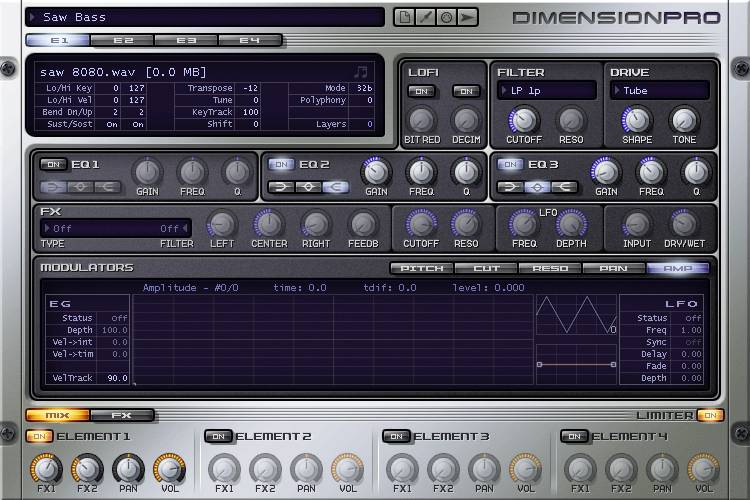
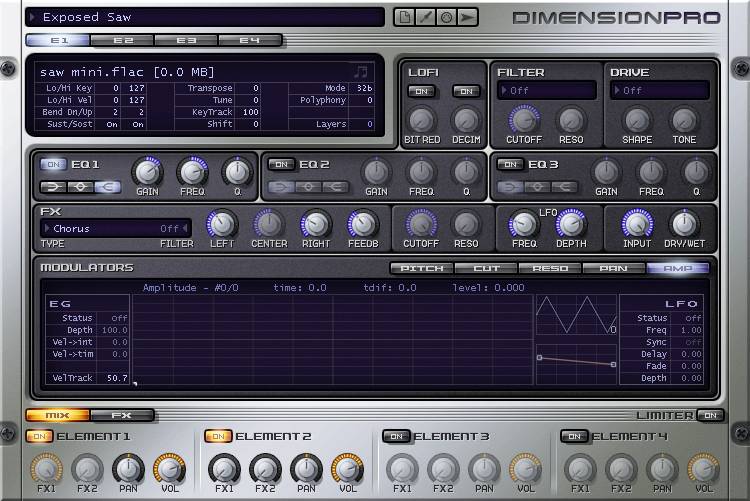
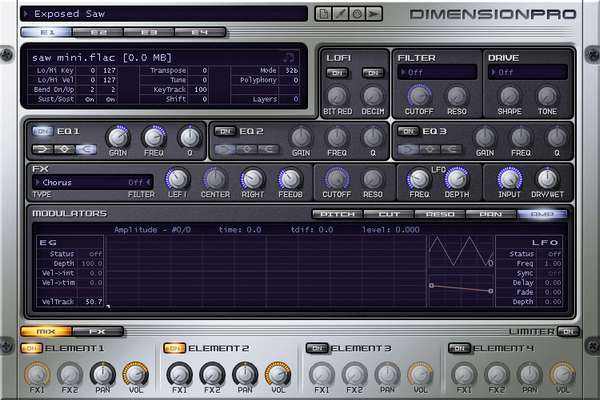
Life opens with a blend of two Dimension Pro presets. I used the "Saw Bass" preset as the low-end sound, and the "Exposed Saw" preset as the bright, sharp sound. These two synths play exactly the same notes simultaneously, and their two complementary tones form a coherent whole. The short gimmick played by these two synths loops over and over from beginning to end, to create a kind of soft sonic bed at a relatively low volume that gets masked throughout the song by the other instruments and reappears during the quieter moments. They nevertheless form an important foundation in the low frequencies. Without that sound, the track feels empty.
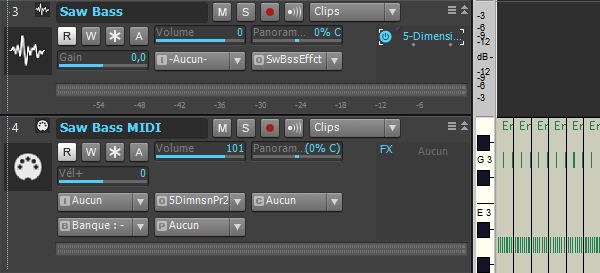
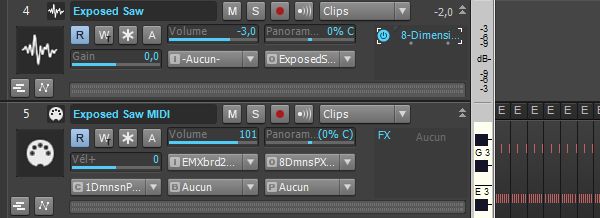
The MIDI track contains the part itself. It's connected to the audio track.
The audio track hosts the Dimension Pro plugin, in which I selected the Saw Bass preset.
Here's the sound of the Saw Bass synth before any processing is applied
(mp3 file)
Source: part played on the keyboard
Destination: Saw Bass Effects bus
Volume: 0 dB
Pan: center
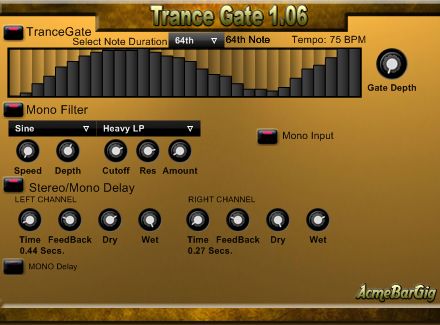
On this bus, I placed a free effect plugin called Trance Gate, designed by AcmeBarGig. Its makers describe it as "a tremolo on steroids". I played around with its settings until I got a stereo effect that wanders from left to right and gives the sound a bouncy feel.
Here's the sound obtained with the Trance Gate plugin
(mp3 file)
Source: Saw Bass synth audio track
Destination: Saw Bass Automation bus
Volume: -11 dB
Pan: center
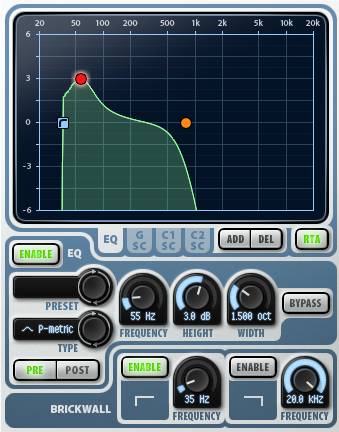
On this bus, I placed a parametric equalizer called "TrackPlug" from Wave Arts. I set the brickwall to 35 Hz to cut all lower frequencies. Then I used automation to have the TrackPlug's EQ settings change during playback. The automation only runs during the first 5 bars (a little under 13 seconds). I felt it was only justified when there wasn't too much instrumentation, and became unnecessary throughout the rest of the song.
Here's the sound after applying automation on the TrackPlug
(mp3 file)
Source: Saw Bass Effects bus
Destination: Saw Bass bus
Volume: 0 dB
Pan: center
Automation settings
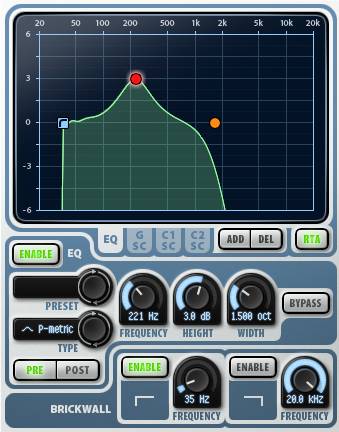
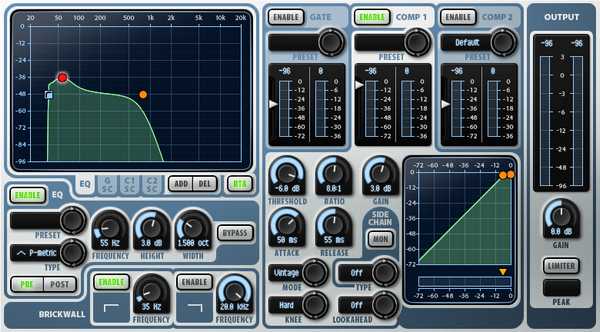
1 - I first placed myself at the very beginning of the song. In the parametric EQ section of TrackPlug, I created a first frequency point (parametric type) at 55 Hz and +3 dB, then a second point (low-pass type) at 774 Hz. I also enabled the brickwall and set it to 35 Hz, in order to fully cut all frequencies below that level.
- Then I moved to the start of bar 2. I set the first frequency point to 221 Hz and the second to 1.20 kHz. The brickwall doesn't move.
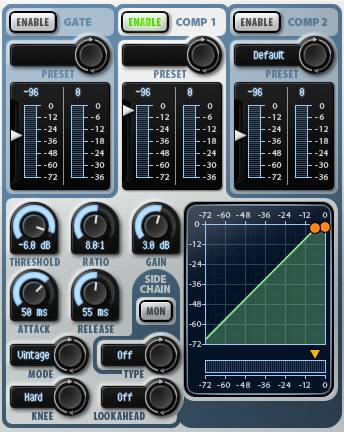
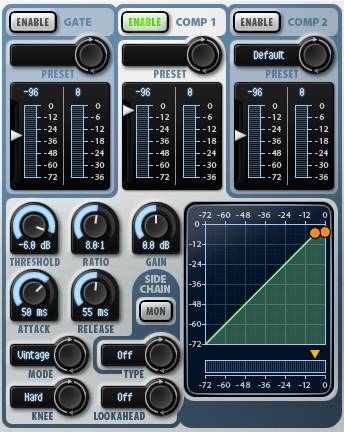
2 - At the start of bar 1, the first compressor in TrackPlug has its gain set to 3 dB. It drops to 0 dB at the start of bar 2:
3 - I keep alternating settings from one bar to the next. The automation will therefore make the first frequency point gradually move from 55 Hz to 221 Hz, then back to 55 Hz, and so on; the second frequency point will move from 774 Hz to 1.20 kHz and back; and the compressor's gain will alternate between 0 and 3 dB. This creates a constant automatic evolution of the synth's tone.
This is the output bus. The sound coming out of it is the final Saw Bass synth tone. On this bus, I placed a parametric equalizer called "TrackPlug" from Wave Arts, as well as a "FinalPlug" limiter from the same brand.
Here's the final Saw Bass synth tone with all processing applied
(mp3 file)
Source: Saw Bass Automation bus
Destination: Synths bus
Volume: 0 dB
Pan: center
TrackPlug plugin
Here are the settings used with the TrackPlug plugin on the Saw Bass bus:
TrackPlug is a paid plugin; you can find free EQs like Cockos ReaEQ. I'll let you search :-)
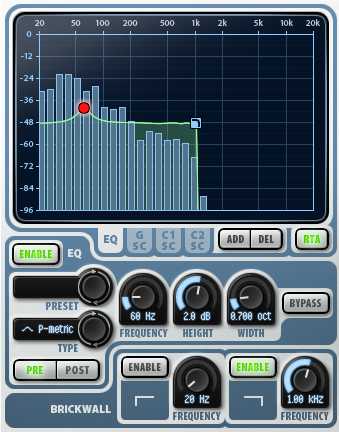
- I activated a brickwall at 1 kHz that cuts all higher frequencies and preserves the synth's role as a bass.
- I placed an EQ point at 60 Hz, +2 dB, with a width of 0.7 octave, which adds a bit of depth to the sound (red dot in the screenshot below). To prevent this 60 Hz frequency from being masked by the kick drum, I attenuated this frequency on the kick (see here).
FinalPlug plugin
Here are the settings used with the FinalPlug plugin on the Saw Bass bus:
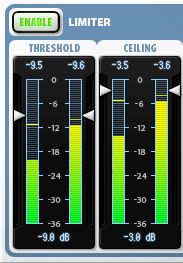
FinalPlug is a paid plugin, but free limiters exist, as well as compressors (which can act as limiters with the right settings). A limiter lets you boost the sound by setting a floor volume from which the sound will be raised up to a maximum ceiling value.
- The threshold is set to -9 dB.
- The ceiling is set to -3 dB.
Audio and MIDI tracks
The "Saw Bass Effects", "Saw Bass Automation" and "Saw Bass" buses
The MIDI track contains the part itself. It's connected to the audio track.
The audio track hosts the Dimension Pro plugin, in which I selected the Exposed Saw preset. Note that the purpose of this synth is to be a complement to the first synth. Both play exactly the same notes, but the first synth provides a low-end sound, while this second synth adds a brighter, sharper note. They're present together from beginning to end of the song.
Here's the sound of the Exposed Saw synth
(mp3 file)
Source: part played on the keyboard
Destination: Exposed Saw bus
Volume: -3 dB
Pan: center
The sound of this synth is much more powerful out of the box than the first synth's. To prevent the track from clipping, I therefore lowered this track's volume by a few dB. This allows a clean, distortion-free signal to be sent to the bus.
Since synths 1 and 2 complement each other, here's what the blend of the two sounds like
(mp3 file)
Source: Exposed Saw synth audio track
Destination: Synths bus
Volume: -23 dB
Pan: center
As I mentioned earlier, the volume level of this synth is rather high. So I lowered this bus's volume to -23 dB, to roughly match the same level as the first synth. Since these two synths need to complement each other, I had to find the level that worked for me so that the two sounds blend well and each bring their own touch. It turned out that -23 dB was the right volume to my liking.
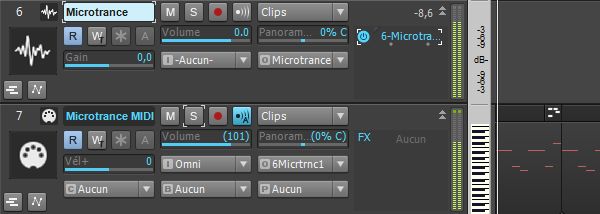
The MIDI track contains the part itself. It's connected to the audio track.
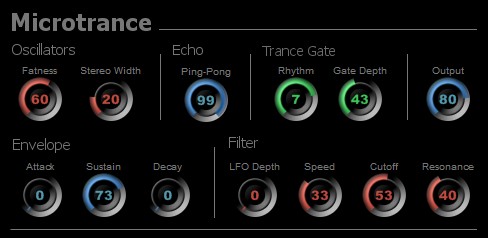
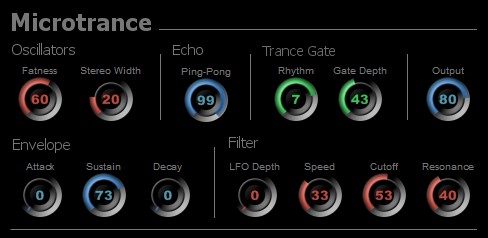
The audio track hosts the Microtrance plugin, in which I dialed in my own settings to get a sound I liked. This synth is present from bar 13 to bar 22 (from 38'' to 1'07'') and then from bar 31 to bar 46 (from 1'36'' to 2'22'').
Here's the sound of the Microtrance synth.
Note that this sound is stereo by default, thanks to Microtrance's "Ping-Pong" option.
(mp3 file)
Source: part played on the keyboard
Destination: Microtrance bus
Volume: 0 dB
Pan: center
This is the output bus. On this bus, I placed an equalizer ("TrackPlug" by Wave Arts) and applied automation for frequency and pitch. The automation also applies to the pan, to make the sound move from left to right and back. It also applies to the volume at the end, to bring the sound down to zero. Watch the video below to see how the automation acts on the sound. Note that this automation is applied to the synth between bars 13 and 22 (from 38'' to 1'07'' in the song).
I also added a limiter ("FinalPlug" by Wave Arts) to boost the sound.
Here's the sound obtained after the automation and the limiter:
(mp3 file)
Source: Microtrance synth audio track
Destination: Synths bus
Volume: -9 dB
Pan: center
I adjust this bus's volume so that the Microtrance synth sits a little louder than the two previous synths, without however moving to the foreground. The sound is present, but slightly hidden behind the guitars. The goal wasn't to put it up front, but to enrich the mix with its relatively discreet presence. It creates a sonic layer whose absence would leave a void, even if the nuances are barely audible.
Here's the video showing the automation:
Microtrance synth automation
FinalPlug plugin
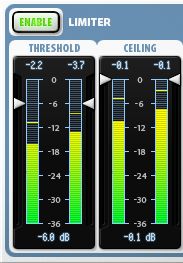
Here are the settings used with the FinalPlug plugin on the Microtrance bus:
FinalPlug is a paid plugin, but free limiters exist, as well as compressors (which can act as limiters with the right settings). A limiter lets you boost the sound by setting a floor volume from which the sound will be raised up to a maximum ceiling value.

 |
|